Reading the table
Goal of this article: read every column for what it actually is, and know the two conventions behind the drop and windage figures — the ones that make a correct table look wrong.
The table is the primary view: one row per step of the run, in the units of the window’s measurement
system, with the angular columns in whatever you chose under View → Angular Units. Reach it with
Ctrl+T or View → Show → Table.
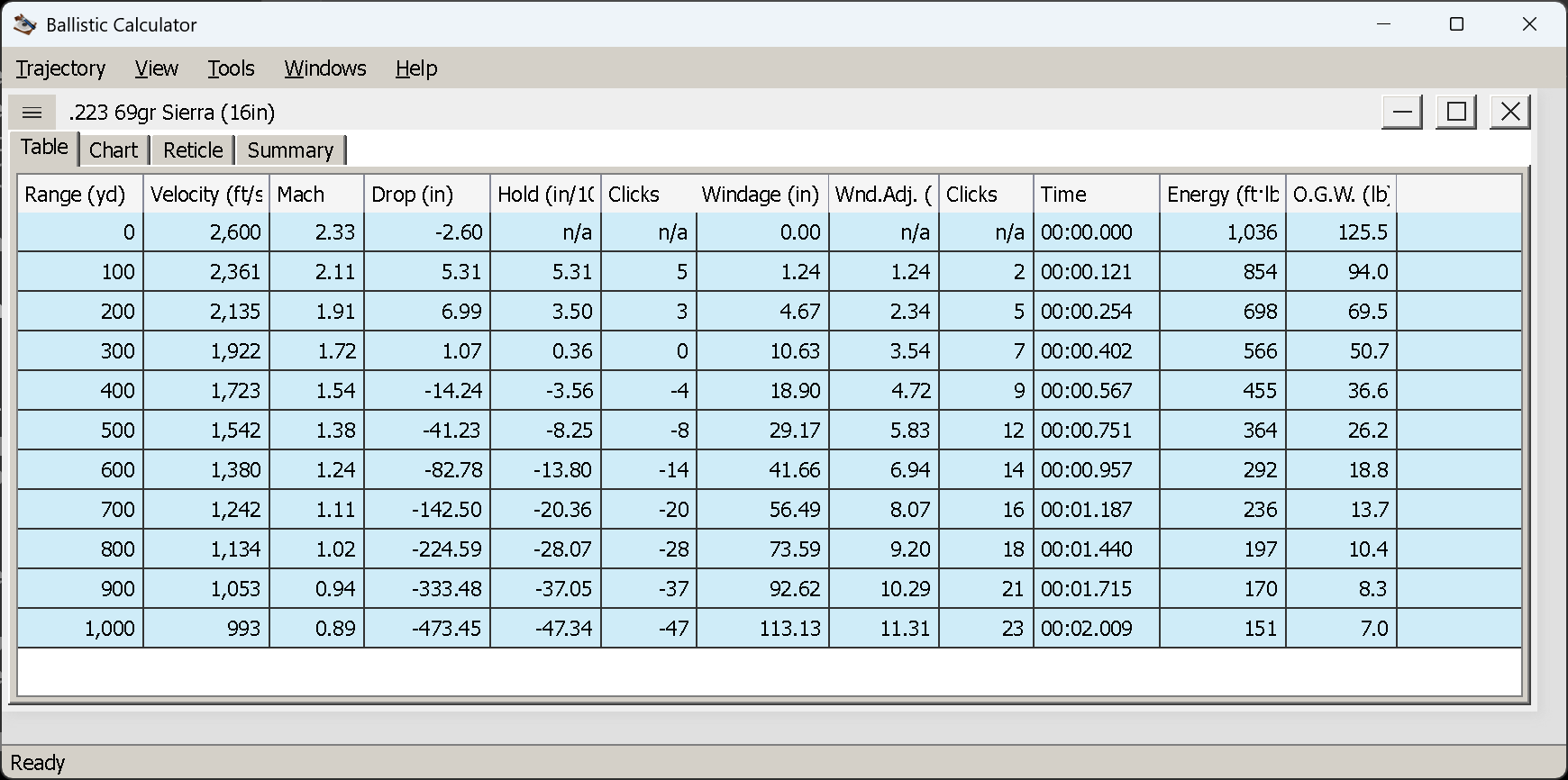
A .223 69 gr Sierra, 300 yd zero, out to 1,000 yd in 100 yd steps.
The columns
| Column | Imperial | Metric | What it is |
|---|---|---|---|
| Range | yd | m | Distance along the line of sight |
| Velocity | ft/s | m/s | Remaining velocity |
| Mach | — | — | Velocity as a fraction of the local speed of sound. 1.00 is the transonic region, and the speed of sound moves with temperature, so this is not a fixed velocity |
| Drop | in | cm | Where the bullet is, vertically. Two conventions — see below |
| Hold | angular | angular | The angle that corrects that drop |
| Clicks | count | count | Hold ÷ your elevation click size |
| Windage | in | cm | Total horizontal deflection. Positive is left |
| Wnd.Adj. | angular | angular | The angle that corrects the windage |
| Clicks | count | count | Windage adjustment ÷ your windage click size |
| Time | mm:ss.fff | mm:ss.fff | Time of flight |
| Energy | ft·lb | J | Kinetic energy remaining |
| O.G.W. | lb | kg | “Optimal game weight” — a rule of thumb, see below |
Note the metric drop and windage: centimetres, not millimetres. And the two Clicks columns are
different columns — the first belongs to Hold, the second to Wnd.Adj.
The first row, at the muzzle, shows n/a in Hold, both Clicks columns and Wnd.Adj. An angle that corrects a deviation at zero distance is not a number.
Drop versus Hold — a distance and an angle
They describe the same thing in two languages, and mixing them up is the most common misreading of a ballistic table.
Drop is a linear distance at that range: at 1,000 yd the bullet is 473 inches below the line of sight. It tells you where the bullet is. It is not something you can dial.
Hold is the angle that corrects it — the same correction expressed as MOA, mils or whatever you picked, which is what your turret and your reticle are marked in. It is what you dial or hold. The two are related by the range, which is why the drop at 1,000 yd is 40 times the drop at 100 yd while the hold is nowhere near 40 times bigger.
Clicks is simply the hold divided by your click size, so it needs click values on the Rifle tab. Without them the column reads n/a — the hold is still there, in angular units.
Drop: over the line of sight, or over the muzzle
View → Drop switches the convention, and the difference is invisible until you shoot at an angle.
Over Line of Sight (the default, and what you want) measures the bullet perpendicular to your line of sight. It is zero at the zero distance, positive where the bullet is above the crosshair — between the near and far zero — and negative beyond. This is the number that corresponds to a hold.
Over Muzzle Level measures the bullet’s height against the horizontal plane through the muzzle. On a level shot the two are identical to the last decimal, which is why the menu item looks like it does nothing. On an inclined shot they part company completely:
| 500 yd, .223 69 gr | Over Line of Sight | Over Muzzle Level |
|---|---|---|
| Level shot | −68.40 in | −68.40 in |
| 30° uphill | −55.91 in | +8,936 in (745 ft) |
The second figure is not a bug. Shooting 500 yd up a 30° slope raises the target 750 ft above you, so the bullet really is 745 ft above the height of your muzzle when it arrives — and only 56 inches below where you are looking. Over Muzzle Level answers “where is the bullet in space”; Over Line of Sight answers “where do I hold”. Use the first to understand a trajectory, the second to shoot it.
Note in passing that the inclined shot needs less elevation than the level one at the same distance (−55.91 against −68.40): gravity only acts across part of the line of sight when that line is tilted.
Windage: one column, several causes
Windage is signed, and positive is left. A wind from your right pushes the bullet left and shows as a positive figure; a right-hand twist drifts it right and shows as negative.
The column is the total horizontal deflection, not just wind. It contains, when their inputs exist:
- wind deflection, from the Wind tab;
- spin drift, if the twist and the bullet’s dimensions are known — which is why a table with no wind at all can still show windage;
- the Coriolis horizontal component, if latitude was entered;
- any horizontal impact offset you declared at the zero.
That combination is worth remembering when a figure surprises you: a right-twist rifle in a wind from the right has two effects pulling opposite ways, and the column shows only their sum. To see them separately, remove one input and recompute.
Energy and O.G.W.
Energy is kinetic energy at that range — the usual quantity in legal minimums and in hunting recommendations.
O.G.W. is “optimal game weight”, and deserves its scare quotes. It is computed from the bullet’s weight and its remaining velocity alone:
weight² × velocity³ × 1.5 × 10⁻¹²
That is a published rule of thumb, and its inputs tell you what it cannot know: nothing about bullet construction, expansion, sectional density, shot placement or the animal. Treat it as a rough comparative figure between loads at a range, not as advice about what you may ethically shoot. The risk notice applies to this column more than to any other.
Getting the numbers out
Trajectory → Export As CSV writes the table as it stands, in two flavours: Local Format (for Excel)
uses your regional decimal separator and list separator so a double-click opens cleanly in a local Excel;
Invariant Format (portable) uses dots and commas regardless of locale, which is what you want for a
script or for sending the file elsewhere.
Column widths are draggable, and are remembered between sessions.
Next
The chart view — the same numbers as a curve, and the one chart mode that shows you something the table cannot.